
Claude alone
Claude Sonnet 5.5, writing its own scripts
- Tokens written per job
- 1,409
- Tokens read per job
- 43,620
- Steps per job
- 6.3
- Cost per job
- $0.056
Per 1,000 jobs$56
Ask Claude, Codex, Cursor, Gemini or a model on your own Mac for a finished file. OwnClip makes it on your Mac in one call, and your assistant hands it back.
Every plan includes the everyday tools. Studio gives your assistant all of them.
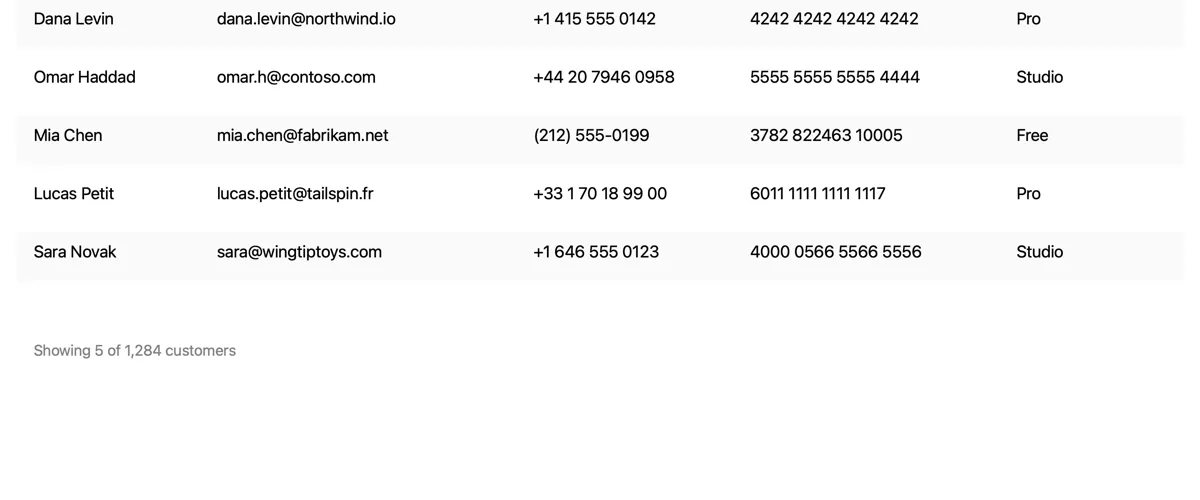
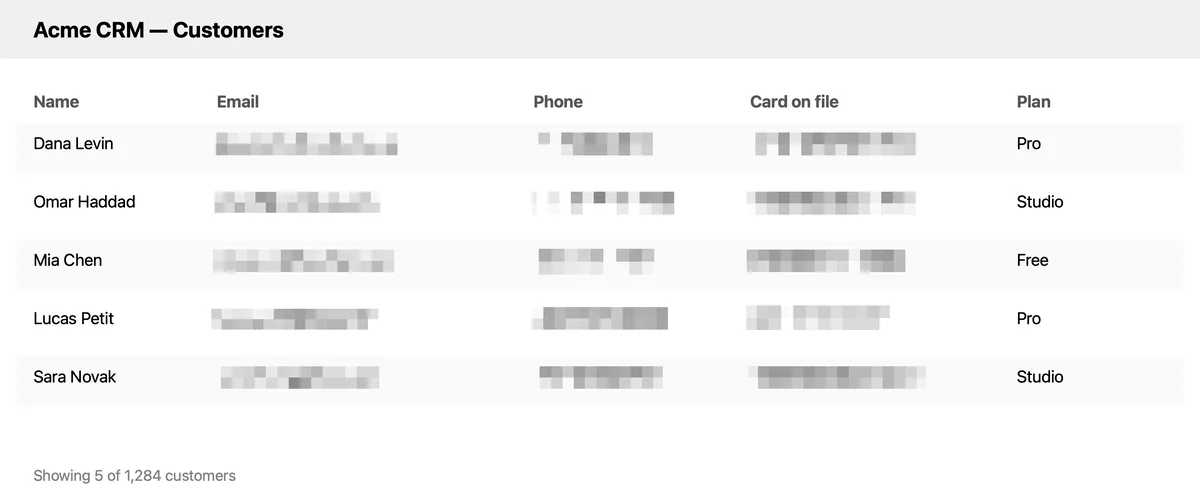
Real OwnClip output from our benchmark run on an M1 Max. The same OwnClip tools do the work whichever assistant asks.1
OwnClip speaks MCP, the standard way AI apps use tools. Cloud or local, terminal or editor, they all get the same studio.
Screenshots, audio, video, screen recordings and your capture library. Your assistant picks the right OwnClip tool and you get the file. Some jobs need Studio’s full tool set and their switch turned on in Settings.
Alone, an assistant writes and rewrites its own image and audio scripts. With OwnClip it makes one call. Same result, a smaller bill. We measured it with Claude Sonnet 5.5.
“Cut the product out onto a transparent background.” Claude Sonnet 5.5, averages of 5 runs each. Both results passed the same check.1
Claude Sonnet 5.5, writing its own scripts
Claude Sonnet 5.5, one call per job
2.3× lower cost, the same checks passed1
Qwen3.8 27B, running on the Mac
No API bill
The files each side produced, for each job. Every result was checked automatically: OCR for leaked data, transparency, frame size and audio levels.
A model running on your own Mac, using OwnClip: no API bill, and nothing leaves the Mac. One tool call per job; without OwnClip the same model took 29 s to 7 min and up to 24 turns.2 On an M5 Max we estimate 13–16 seconds a job.3 The model we used held about 16 GB of memory.
Seconds per job with Qwen3.8 27B and OwnClip, for hiding private data and cleaning noisy audio, averaged. Tested Macs at idle speed; M5 times are estimates, not measurements.3
An assistant works with OwnClip only the way you allow, and you can stop it at any moment.
Before an assistant publishes a share link, changes your Brand Kit, moves anything to the Trash or throws away unsaved changes, OwnClip asks you.
While an assistant is connected, OwnClip’s menu in the menu bar says so. Stop AI Assistant Access cuts it off at once.
Each kind of action has its own switch. OwnClip sends the image itself to the assistant only if you turn that on; otherwise it hands back the file path.
In OwnClip, open Settings → General → Agent control and switch it on. Then turn on Edit and export: most jobs write a new file, and that switch starts off.
Run this once in Terminal.
claude mcp add ownclip -- npx -y ownclip-mcp
“Hide the emails and card numbers in crm.png.” “Clean up the hiss in memo.wav.” Your assistant hands the job to OwnClip and tells you where the file is.
Free and Pro include the everyday tools. Studio adds the rest: storylines, productions, the AI studios, Smart Redact and managing your library.
Everything an assistant can ask OwnClip for, you can do yourself in the app.
MCP (Model Context Protocol) is the standard way AI apps call tools. OwnClip includes an MCP server, so an assistant such as Claude or Cursor can ask OwnClip to do media work on your Mac and get the finished file back, instead of writing its own scripts.
Across five everyday jobs, Claude Sonnet 5.5 cost 2.3× less with OwnClip ($24 against $56 per 1,000 jobs) and wrote 3.4× fewer tokens, and every result passed the same automatic check. With a model running on your Mac there is no API bill at all.
By default, the essential set: read text in an image, describe a media file, transcribe, beautify a screenshot, remove a background, clean a screenshot of your personal details, annotate from a sentence (Pro), erase an object, clean up audio, add captions, reframe a video, export, and start, stop or check a recording. You can offer every OwnClip tool in Settings; the essential set keeps each conversation smaller, because an assistant reads the description of every tool it is offered.
Turn on agent control in OwnClip under Settings → General, and switch on Edit and export. In Claude Code run: claude mcp add ownclip -- npx -y ownclip-mcp. In Codex run: codex mcp add ownclip -- npx -y ownclip-mcp. In Claude Desktop, Cursor, Windsurf, Gemini CLI or LM Studio, add ownclip to the mcpServers list with the command npx -y ownclip-mcp. Any other app that supports MCP can run the same command as a stdio server. Then ask for the result you want.
Yes, with any app that runs a model on your Mac and supports MCP tools. In our test Qwen3.8 27B (Ollama 0.40.6) with OwnClip took 14–112 s per job on an M1 Max that was running other work, and needed one tool call per job; without OwnClip it took 29 s to 7 min. Nothing leaves the Mac. It needs memory: the model held about 16 GB.
OwnClip reads and writes your files on your Mac. A cloud assistant receives your request and what the tool returns, such as a file path, recognised text or a transcript. Pictures are sent to it only if you switch that on. With a local model, nothing leaves the Mac.
Every plan, Free included. Free and Pro give your assistant the everyday tools: reading text, transcribing, Beautify, cutting out a background, cleaning a screenshot before an AI sees it, erasing, cleaning audio, captions, reframing, export and recording. Each plan’s own limits still apply: Free records 3 minutes at 720p with the OwnClip mark, and marking up an image from a sentence needs Pro. Studio, a one-time purchase of $99 for two Macs, gives your assistant every OwnClip tool, including Smart Redact, which the private-data test on this page used.