On this page
Audio
Record your microphone and your computer’s sound, clean the voice, fix each track, set the loudness and get a transcript.
- About 2 minutes to test your mic. Allow 10 to 15 minutes to try noise removal, the Mixer and a transcript. Transcribing takes longer for longer recordings.
- Needs a Mac with a microphone (the built-in one works), Permission for OwnClip to use your microphone, and Headphones, if you record your voice and your computer’s sound together.
On the Free plan: recordings are limited to 3 minutes at 720p, with the OwnClip watermark recorded into the video. Pro and Studio remove those limits for new recordings. Free plan details
Words used on this page
- Mixer
- The editor panel with one row (a “strip”) for each sound track: your voice, your computer’s sound and any music. Each row has its own volume, so you can balance them against one another.
- Track
- One separate stream of sound. A recording made with the microphone and System Audio both on has a Mic track and a System Audio track.
- Under speech
- A music setting that makes the music automatically quieter while someone is talking, then brings it back up in the pauses.
- Normalize / loudness
- Sets the whole video to one steady loudness, so viewers do not have to reach for the volume knob. Targets are written as LUFS (a loudness measure); higher numbers are louder. Pick −16 for a spoken interview or podcast and −14 for social video.
- dB (decibel)
- The unit for how loud a sound is. 0 dB is the loudest a file can go; minus numbers are quieter.
- Transcript
- Your spoken words written out as timestamped text that you can read and edit.
- Subtitles (SRT, WebVTT)
- Small text files that hold your transcript with timings. Video sites and players read them to show captions. SRT and WebVTT are the two common formats.
- Whisper
- A speech-to-text model that runs on your Mac. OwnClip downloads it once and uses it when Apple’s own speech recognition is not sure enough.
- On-device
- Done on your Mac. Your audio is not sent to a server to be processed.
- Speaker bleed vs. room echo
- Speaker bleed is your speakers’ sound leaking into the mic. Room echo (reverb) is your own voice bouncing off walls before the mic hears it. They are different problems with different fixes; see Troubleshooting.
Your first win: hear your mic before you record
A short test now saves a bad recording later. It takes about a minute.
- In the sidebar, open Audio.
- Switch Microphone on and choose a preset, such as Podcast.
- Press Test your mic and say a sentence. Press Stop.
- Press Play. If it sounds right, record. If not, try Remove Noise or a different preset.
Using a USB or studio microphone
Plug the microphone in, then open Audio in the sidebar. On the Microphone card, click the device name (it reads System Default until you change it) and pick your microphone from the list. OwnClip remembers your choice. Press Test your mic to check it.
On System Default, OwnClip uses whatever microphone macOS has selected in System Settings, Sound, Input. A microphone missing from the list is usually not seen by macOS yet, so check the cable first.
Fix a hum
OwnClip has no switch made only for mains hum, and no 50 or 60 Hz filter. A hum is steady background noise, which is what Remove Noise targets. Under Effects, switch on Remove Noise. Leave it on Auto (which applies it to external microphones) or pick Always. Try Standard first, then Max, and check with Test your mic. For a take you already recorded, choose Clean Up Voice on the Mic track in the Mixer. A hum that stays is often the cable or a nearby power supply, so try another USB port or move the microphone away from chargers.
Recording a long interview
Take a 45-minute sermon, podcast or interview. Recording: the Free plan stops every recording at 3 minutes, and there is no separate audio-only mode with a different limit. A microphone-only recording is still an OwnClip recording, so the same 3-minute stop applies. Pro and Studio have no time limit. Transcribing: the app puts no length limit and no plan check on transcription, so it is free on every plan and works on a recording of any length. Only the recording step is capped. Test your mic works on any plan, because it is a preview and not a recording.
Sending it: an M4A is saved at 256 kbps, about 2 MB per minute, so 45 minutes is about 90 MB. That is too big for email (most mail limits are 20 to 25 MB). Send a link instead. Smart Share makes one, but it needs an OwnClip sign-in and a connected Google Drive. Without Google, put the file in a shared folder of your own (iCloud Drive, Dropbox, OneDrive) and send that link.
Step by step
Step 1 of 8: Choose what to record and test your mic
Choose what to record and test your mic
You decide whether OwnClip records your microphone, your computer’s sound, or both, and how loud each is.
- Recording mic and system audio together? Wear headphones. Without them, the mic hears the speakers and your recording has an echo.
- The System Audio meter reads Active during recording. It only moves while you record.
- Switch on Hear my mic to listen to the processed sound through headphones while you adjust.
- Your Audio screen may list a few more options than the picture, covered under Effects below.
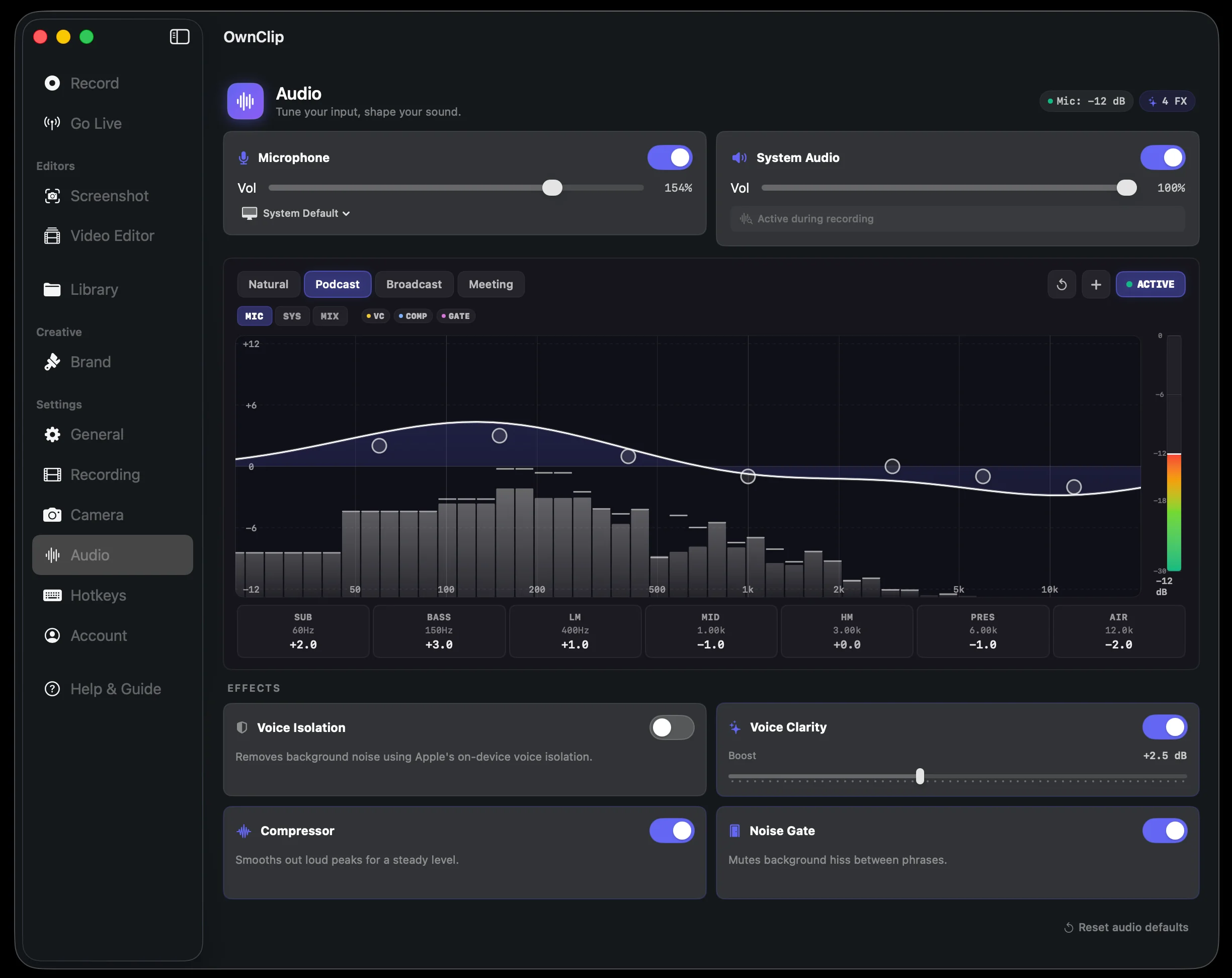
- 1In the sidebar, under Settings, open Audio.
- 2Switch Microphone and System Audio on or off, and set each Vol slider.
- 3Pick a preset: Natural, Podcast, Broadcast or Meeting.
- 4Press Test your mic, talk, press Stop, then Play.
All 8 steps as a list
1. Choose what to record and test your mic
You decide whether OwnClip records your microphone, your computer’s sound, or both, and how loud each is.
- Recording mic and system audio together? Wear headphones. Without them, the mic hears the speakers and your recording has an echo.
- The System Audio meter reads Active during recording. It only moves while you record.
- Switch on Hear my mic to listen to the processed sound through headphones while you adjust.
- Good to know: Your Audio screen may list a few more options than the picture, covered under Effects below.
2. Remove background noise while you record
The Effects section on the Audio screen cleans your microphone before it is saved.
- Effects clean your microphone only. They never change the System Audio track.
- Press Reset audio defaults to go back to the starting settings.
- Turn on Keep a raw mic file if you also want the mic exactly as captured, before processing.
3. Silence a mistake on your voice only
When a recording has both sources, you can silence a mistake on the mic without touching the computer’s sound. This happens in the Mixer, the editor panel with one row for each sound track.
- Press ⌘Z to undo any change. Nothing is deleted.
- Split makes the two tracks from the separate files saved with the recording, and mutes the already-mixed audio. The button reads Re-split into Mic + System once the tracks exist.
- Anything already mixed together before it reached your Mac stays mixed.
- Good to know: Animated illustration, not a screen recording.
- Good to know: Recordings made before separate tracks existed have one mixed track and cannot be split.
4. Balance the volume and tone of each track
Each track has its own volume, tone, noise reduction and mute, and your changes play back live.
- The meter on each strip has a clip light. It stays lit until you click it, so you can see a clip you missed.
- Add Audio, or the + button, adds a new track.
5. Set one steady loudness and export just the audio
Normalizing sets one steady loudness for the whole mix, so viewers do not need to adjust their volume. Then you export the video or just the sound.
- Audio only runs the same loudness and limiter pass as a video export.
- WAV is lossless and biggest. M4A is small and plays everywhere. M4A is saved at 256 kbps, about 2 MB per minute: a 10-minute clip is roughly 19 MB, and a one-hour interview is about 115 MB, too big to email. For long audio, send a link instead.
6. Get a transcript of what you said
You get a timestamped transcript you can edit, and it can become on-screen captions or a subtitle file.
- The Language menu lists 14 languages: English (US and UK), Spanish, French, German, Italian, Portuguese, Japanese, Korean, Chinese, Russian, Arabic, Hindi and Hebrew. It starts on your Mac’s language when that is on the list. Transcription is free on every plan.
- The top of the transcript tells you which engine ran: Standard or Enhanced.
- The refresh button re-transcribes and replaces any edits you made to the transcript.
- Good to know: OwnClip tries Standard first, which is Apple’s speech recognition running on your Mac (“on-device” means nothing is sent to a server). If the result is low-confidence, or it finds no speech in audio that has sound, it runs Enhanced. Enhanced uses Whisper, a speech-to-text model that runs on your Mac. The Enhanced model (about 632 MB) downloads once; your audio is never sent anywhere.
- Good to know: Standard needs the language’s on-device model from System Settings, Keyboard, Dictation, and Speech Recognition allowed in Privacy & Security.
7. Export subtitles (.srt / .vtt)
You save the transcript as a subtitle file that YouTube, Vimeo and most video players can read, or burn captions into the picture.
- The same box has Copy All Text, which copies the words without timings.
- Edit the transcript first. The subtitle file uses the text as it stands when you export.
- Video Analyst (Pro) can also export a transcript as SRT or WebVTT. The Transcript tab does not need Pro.
- Good to know: Subtitles come from the transcript, so they are only as good as it is. Read it through before you export.
8. Add background music under your voice
You add a music track that sits under your voice and plays at a level you set.
- A generated bed loops to fill your clip and starts at −12 dB under speech.
- Under speech needs to know where the talking is. It learns that once you run Transcribe or Silence Removal. Export always follows it.
- Use music you have the right to publish.
- Good to know: Audio Studio is a Studio feature. Adding your own file is free.
Good to know
A few honest limits worth knowing before you record.
Bluetooth headsets record in “call” quality
Using AirPods, a Sonos Ace, or any Bluetooth headset as your microphone makes Bluetooth switch it to low-quality call audio. That also lowers the headset’s own music quality while it is in use. This is how Bluetooth works in every app, not just OwnClip. For full quality, connect the headset with a cable, or use your built-in or a USB mic and keep listening on Bluetooth.
Effects only touch your microphone
Remove Noise, Clean Voice and the other effects clean up your voice and never alter the system-audio track. Clean Voice works on the built-in microphone. Remove Noise (before recording) and Clean Up Voice (in the Mixer, after recording) are the same kind of cleanup in two places.
What separate tracks can and can’t undo
Splitting the two sources separates what your microphone heard from what your computer played. Speaker bleed lives on the mic track and can be muted away. Anything that was already blended into the incoming audio before it reached your Mac arrives as one signal and cannot be pulled apart.
Separate tracks are captured, not recovered
Your mic and computer audio are kept apart at the moment of recording, whenever both are switched on. An older recording made before this existed has them blended into one track and cannot be split afterwards.
The live system-audio meter needs Screen Recording permission
To show the system-audio bars move while you tune the EQ before recording, macOS asks for Screen & System Audio Recording permission and shows its recording indicator while the Audio panel is open. During an actual recording the meters are always live.